


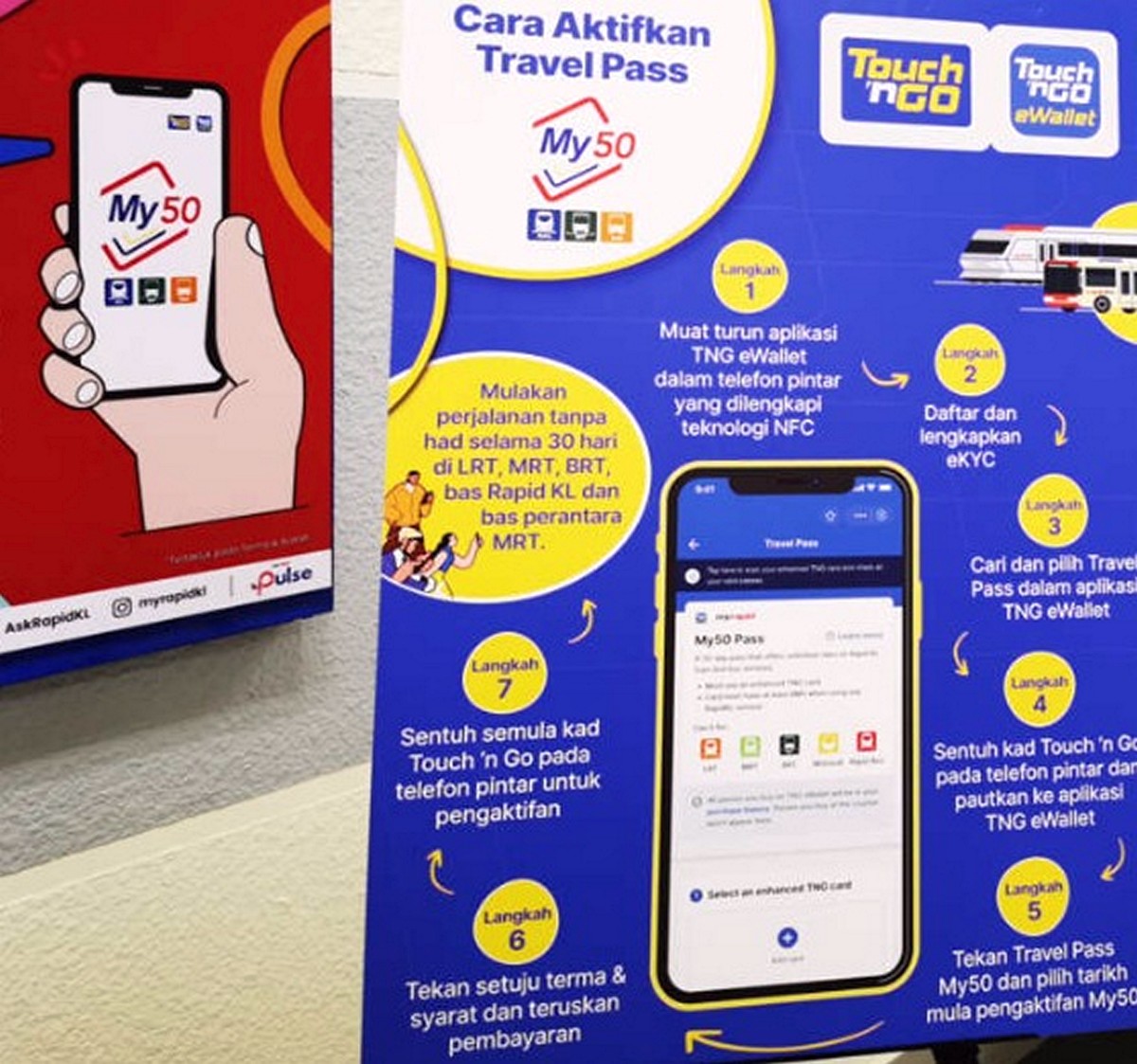
Getting around Kuala Lumpur and the surrounding areas by public transport can be much easier when a monthly travel pass is already sorted out. For regular commuters, the My50 monthly pass can be a useful option, particularly for those who rely on public transport for work, study, shopping and everyday journeys.
The good news is that eligible users can manage their My50 monthly pass digitally through the Touch ’n Go (TNG) eWallet using an enhanced Touch ’n Go card with NFC functionality.
From 10 August 2026 until 31 December 2026, eligible users can apply for or renew their My50 monthly pass digitally, meaning there is no need to make a separate trip to a physical counter simply to handle the application or renewal process.
This is especially convenient for commuters who already have a compatible NFC-enabled Touch ’n Go card and a smartphone that supports NFC. Instead of spending time travelling to a counter and waiting for assistance, much of the process can be completed directly through the TNG eWallet.
What Is the My50 Monthly Pass?
The My50 pass is designed for eligible public transport users who want to manage their regular journeys with a monthly travel pass. For people who use public transport frequently, having a monthly pass can make travelling more straightforward compared with paying for individual journeys every time.
The digital application process makes the experience even more convenient because the pass can be purchased or renewed through TNG eWallet.
However, there is one important detail that commuters should pay attention to.
The application period from 10 August 2026 to 31 December 2026 is not necessarily the same as the validity period of an individual My50 pass. The actual validity depends on the start date selected during the application process.
For that reason, users should always check the start and expiry dates displayed in TNG eWallet before making payment.
What Is Needed Before Applying?
Before starting the My50 application, it is worth checking that everything required is ready.
Users should have an active Touch ’n Go eWallet account with completed e-KYC verification. An enhanced Touch ’n Go card with NFC functionality is also required, together with a smartphone that supports NFC.
The TNG eWallet must also have sufficient balance to complete the payment.
For those who have recently purchased an enhanced Touch ’n Go card, checking whether the card supports NFC is a good idea before starting. The NFC function allows the card to communicate with a compatible smartphone, which is needed during parts of the My50 application and activation process.
The phone’s NFC function should also be switched on.
How to Buy or Renew My50 Through TNG eWallet
The digital application process is relatively straightforward, although users should take their time and check the information shown on screen before confirming anything.
Step 1: Open Touch ’n Go eWallet
Start by opening the TNG eWallet application and logging into the account.
Make sure the account has completed the required e-KYC verification before proceeding.
Step 2: Find Travel Pass
From the TNG eWallet homepage, select “More”.
Look under the Transport section and select “Travel Pass”.
This is where users can access the relevant travel pass services.
Step 3: Select an Enhanced Touch ’n Go Card
Next, choose “Select an enhanced TNG card”.
Users can select an eligible NFC-enabled Touch ’n Go card that has already been linked to the account. If a suitable card has not yet been linked, follow the instructions in the app to link the relevant card.
It is important to select the correct card, especially if several Touch ’n Go cards are connected to the account.
Step 4: Check the NFC Function
Before continuing, make sure both the card and smartphone are NFC-compatible.
The phone’s NFC function needs to be switched on because the card will need to communicate with the smartphone during the application and activation stages.
If the phone does not detect the card, checking the NFC setting and the position of the card against the phone can be a useful first step.
Step 5: Tap the Card Against the Phone
When prompted by the TNG eWallet, place the enhanced Touch ’n Go card against the NFC area of the smartphone.
Keep the card in position until the application detects it successfully.
The location of the NFC antenna can vary between smartphone models, so users may need to move the card slightly if the phone does not immediately recognise it.
Step 6: Choose the My50 Start Date
After the card has been detected, select the preferred start date for the My50 monthly pass.
This is an important step because the selected date determines when the pass begins.
Once the preferred date has been selected, tap “Apply”.
Step 7: Read and Confirm the Terms
The application will display the relevant terms and conditions.
Read through the information carefully before confirming the application. Once the terms have been reviewed and accepted, tap “Confirm”.
Step 8: Double-Check the Pass Details
Before paying, the TNG eWallet should display the My50 pass information, including the start and expiry dates.
This is probably the most important stage to check carefully.
Make sure the dates are correct and that the selected pass matches the intended travel period. If everything looks right, proceed by tapping “Pay”.
Step 9: Activate the Pass
After payment has been completed, the app may prompt users to tap the NFC-enabled Touch ’n Go card against the smartphone once again.
This step allows the My50 pass to be activated onto the selected card.
Keep the card against the phone as instructed and wait for the activation process to finish.
Step 10: Wait for Confirmation
Once the payment and activation have been successfully completed, a confirmation notification should appear.
Users can then use their My50 pass according to the validity period displayed in the TNG eWallet.
Why Is This My50 Deal Worth Considering?
For regular public transport commuters, convenience is arguably one of the biggest advantages of this digital process.
Previously, dealing with a monthly travel pass could mean making time for a visit to a physical counter. With the digital option, eligible users can manage the application or renewal through TNG eWallet, provided they have the required account, card and NFC-compatible smartphone.
That can be particularly useful for people with busy working schedules. A commuter who already has everything prepared can handle the process through their phone instead of making an additional journey just to renew a pass.
It is also handy for existing Touch ’n Go users who already use the eWallet and an enhanced NFC card. There is less need to manage another separate process when much of the application can be handled within the same digital platform.
Another reason to consider the My50 digital application is that it allows users to check the pass dates before payment. This gives commuters an opportunity to make sure the selected start date suits their travel plans.
For someone who takes public transport regularly throughout the month, a monthly pass can also be more convenient than repeatedly thinking about individual fares. The real value, however, depends on the user’s eligibility, travel habits and the current My50 terms and pricing.
Important Things to Remember
The digital My50 application is available from 10 August 2026 to 31 December 2026, but that should be treated as the application period rather than automatically assuming that every pass expires on 31 December 2026.
A pass purchased towards the end of the application period may have a validity period that extends beyond that date, depending on the selected start date and applicable rules.
Users should therefore check the latest information shown by TNG eWallet before paying.
It is also worth making sure the enhanced Touch ’n Go card is working properly, the smartphone’s NFC function is enabled and the eWallet account has completed e-KYC verification.
Most importantly, check the My50 start and expiry dates carefully before confirming the payment.
Why Go for the Digital Option?
The main attraction is simple: it can save time and make the My50 application process easier to manage.
For eligible commuters who already have an NFC-enabled enhanced Touch ’n Go card and a compatible smartphone, there is little reason to make the process more complicated than necessary. The TNG eWallet provides a convenient way to apply or renew digitally, while the NFC function connects the physical card with the digital application process.
Anyone who regularly uses public transport and is considering My50 should take the opportunity to check their eligibility and compare the pass with their usual travel needs.
With the digital application available from 10 August until 31 December 2026, this is a useful option to keep in mind, particularly for commuters looking for a simpler way to manage their monthly public transport pass.
As always, users should check the latest eligibility requirements, pricing, terms and conditions displayed by Touch ’n Go before completing the transaction, as these details can change.
Promotional/Event Details
Date: 10 August 2026 – 31 December 2026
Time: Available through TNG eWallet during the application period
Venue: Touch ’n Go eWallet
Pass: My50 Monthly Public Transport Pass
Card Required: Enhanced Touch ’n Go NFC-enabled card
Account Requirement: e-KYC-verified Touch ’n Go eWallet account
Phone Requirement: NFC-compatible smartphone with NFC switched on
Application Method: Digital application and renewal through TNG eWallet
Important: Check the My50 pass start and expiry dates shown in the app before making payment.

EverydayOnSales help brands connect with our community, the largest warehouse sales consumers database in Malaysia. Advertise with EverydayOnSales Malaysia.